Simple guides for better PDF links.
Learn how to create PDF links, understand view activity, use QR codes, add access controls, and send client files more clearly.
Share a PDF
Add a PDF Link in Canva and Share a Canva PDF
Link to a PDF from inside a Canva design, or download your design as a PDF and share it as a link and QR code. Steps and limits.
Deliver a Lead Magnet PDF Without a Website
Share a lead magnet PDF with one link, ask for an email before it opens, and export the leads. No landing page, no website.
Embed a PDF in WordPress, Wix and Squarespace
Embed a PDF on WordPress, Wix or Squarespace with an iframe code block. Working snippet, sizing tips and the plan each builder needs.
Link or Embed a PDF in Google Docs and Sheets
How to put a PDF in Google Docs and Sheets: insert a link, a Drive file chip or an image of the pages. Steps for each, and what readers see.
How to Create a Link or URL for a PDF (5 Free Ways)
Five free ways to make a PDF link or URL anyone can open: PDF hosting, Google Drive, Dropbox, OneDrive and your own site. Steps, trade-offs and fixes.
How to Embed a PDF in HTML (Working Code)
Embed a PDF in a web page with iframe, object or embed. Copy-ready HTML, a mobile fallback, and a free embed option that needs no hosting.
How to Embed a PDF in an Email (What Works)
Gmail and Outlook will not show a PDF inside an email body. Three ways that work instead: attach it, add a preview image that links to it, or send a link.
How to Put a PDF Link in Your Instagram Bio
Instagram cannot host a PDF, but your bio can link to one. Turn the PDF into a link, add it to your profile, and use story link stickers for new files.
How to Send Large PDF Files (5 Ways That Work)
Email stops at about 20 to 25 MB. Five ways to send a large PDF: compress it, use a link, cloud storage, Mail Drop or a file transfer service.
How to Send a PDF by Email (and Size Limits)
Send a PDF by email with Gmail or Outlook, learn the attachment size limits, and what to do when the file is too big. Link option included.
How to Send a PDF: 6 Ways, From Email to Links
How to send a PDF by email, link, WhatsApp, text, cloud drive or transfer service, and how to pick the right way for the size and the person.
How to Share a PDF on WhatsApp (Phone and Computer)
Share a PDF on WhatsApp as a document or as a link. Steps for phone and computer, the 2 GB document limit, and when a link works better.

How to Share a PDF Online: 7 Free Ways (2026)
The 7 free ways to share a PDF online, compared: email, cloud storage, transfer services, PDF links, chat apps, social posts and embeds.
Track a PDF
Best Document Tracking Software (Free Plans, 2026)
Document tracking software compared by free plan, what the tracking shows and price: Papermark, PDFTrackr, Peony, SharePDF and more. Checked November 2026.
Gmail Read Receipts: How They Work
Gmail read receipts only work on Google Workspace accounts, not personal gmail.com. How to request one, what it cannot show, and a PDF-level option.
Outlook Read Receipts: How They Work
Outlook read receipts are optional for the recipient, who can decline to send one. How to request them, where they fail, and a better way to track a PDF.
What Is a Read Receipt? Email and Message Receipts
A read receipt tells the sender a message was opened. How they work in Gmail, Outlook, iMessage and WhatsApp, why they fail, and what to use for a PDF.
Can You Tell If Someone Opened Your PDF? 3 Ways
You usually cannot tell from an attachment. Three methods work: read receipts, Drive or Dropbox activity, and tracked PDF links that show read time.
Protect a PDF
How to Password Protect a PDF (File or Link)
Password protect a PDF file in Preview, Word or Adobe, or put the password on the link you share. Steps for each, and which one stops what.
Secure Document Sharing: How to Share PDFs Safely
How to share documents securely: passwords, expiring links, download control and who can open what. Five ways compared, plus the tools that do it.
PDF QR codes
Free Digital Menu From a PDF (No Ordering System)
Turn your PDF menu into a digital menu with one link and one QR code, then change prices later without reprinting. No ordering system needed.
Add a PDF Menu to Google Business Profile
How to add a menu link to your Google Business Profile, who can use it, and how a replaceable PDF link keeps the menu current.
How to Make a QR Code for a PDF (Free, 3 Steps)
Make a QR code that opens a PDF: upload the file, get a link, download the code. Static vs dynamic codes, print sizes and how to test before printing.
Menu QR Code Size and Placement Guide
How big a menu QR code should be, where to place it, and how to test it: minimum size, contrast, quiet zone and what to check on a printed proof.
PDF Menu vs Website Menu: Which Is Better?
PDF menu or website menu for a restaurant or cafe? A fair comparison of speed, search, updates and phones, with a simple way to decide.
PDF QR Codes for Flyers and Events
Put a QR code on a flyer, poster or event programme that opens a PDF. What to link, where to place it, print sizes, and how to update it after printing.
QR Code Menu From a PDF: How to Make One
Turn your PDF menu into a QR code for tables, windows and flyers. Steps, why to use an unlisted link, and how to update it later.
Update a Menu Without Reprinting the QR Code
Change prices and dishes without reprinting your menu QR code. Replace the PDF behind the same link and keep every printed code working.
Comparisons
Best PDF to Link Tools Compared (2026)
Six ways to turn a PDF into a link, compared: Google Drive, Linkyhost, Tiiny Host, PDFHost, Papermark and SharePDF. Free limits, accounts and tracking.
DocSend to PDF: Save a Document You Were Sent
Why some DocSend links will not download, what to ask the sender, and what is fair. Plus how to let your own readers download your PDFs.
Free PDF Hosting: 6 Options Compared (2026)
Free PDF hosting compared: how big a file, how long it stays online, view caps and banners on SharePDF, Google Drive, Linkyhost, Tiiny Host and more.
SharePDF vs DocSend: Price and Features (2026)
SharePDF vs DocSend compared on price, tracking, data rooms and limits, with plain notes on what SharePDF does not do. Checked 20 November 2026.
SharePDF vs Papermark: Which Fits Your PDFs?
SharePDF vs Papermark compared on price, analytics, data rooms, open source and limits, with who should pick which. Checked 20 November 2026.
DocSend Pricing 2026: Plans and What You Really Pay
DocSend costs $10 to $180 a month on yearly billing, with no free plan after a 14-day trial. Every plan, what it includes, and what a small team pays.
DocSend vs Dropbox: Which One Do You Need?
Dropbox owns DocSend, but they do different jobs: Dropbox stores and shares files, DocSend tracks reading. What changed when Send & Track ended.
DocSend vs Google Drive for Sharing PDFs
Google Drive stores and shares files for free; DocSend tracks how they are read, from $10 a user a month. Where each one fits, compared side by side.
Papermark vs DocSend: Price, Features, Ease of Use
Papermark has a free plan and is open source. DocSend has no free plan and starts at $10 a user a month. Prices, features, ease of use and who each suits.
SharePDF updates

From 100 to 200 Users: What We Improved
SharePDF has reached 200 users. Here is what we improved since 100: Word and PowerPoint uploads, PDF replacement and a better dashboard.

SharePDF Now has 100 Users
SharePDF has reached 100 users, with 155 PDFs uploaded and 812 total views so far.
Better Analytics for Your Shared PDFs
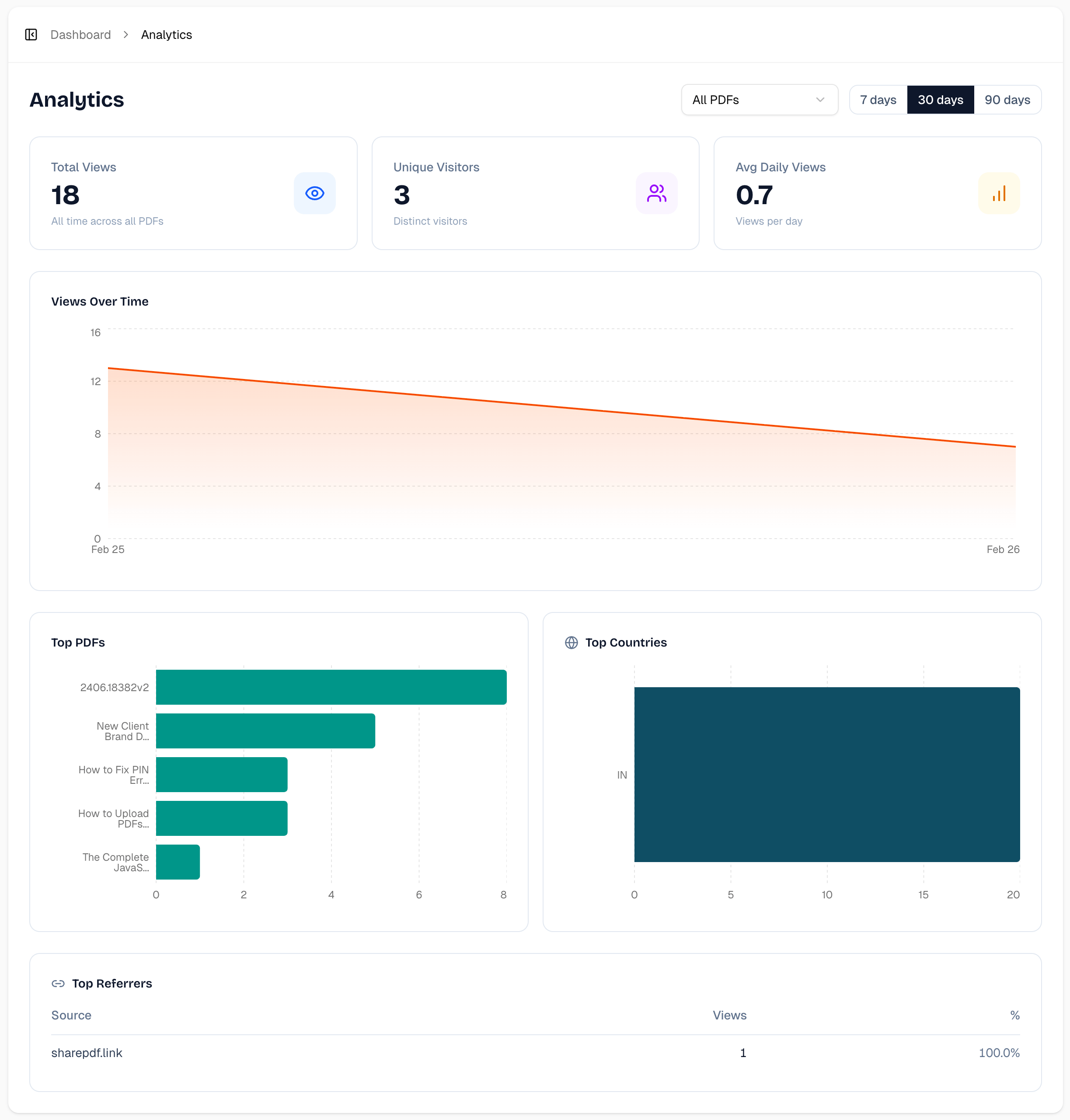
SharePDF now shows you exactly how people interact with your shared PDFs - views over time, where viewers are, and how they found your PDF.
