What Is a Read Receipt? Email and Message Receipts
A read receipt tells the sender a message was opened. How they work in Gmail, Outlook, iMessage and WhatsApp, why they fail, and what to use for a PDF.
Quick answer: a read receipt is a notice sent back to you when someone opens your message. In email, the recipient's app has to support it and the recipient usually has to agree, so many receipts never arrive. In chat apps such as iMessage and WhatsApp, receipts are a setting that either side can turn off. None of them tells you whether an attached PDF was opened.
How a read receipt works
There are two kinds, and they behave differently.
| Where | How it works | Can the reader stop it? |
|---|---|---|
| You ask for a receipt; the reader's mail app may send one back | Yes, usually by declining or ignoring | |
| Chat apps | The app shows a "Read" label or blue ticks automatically | Yes, by turning off read receipts |
| Email tracking | A hidden image in the email reports when it loads | Often, because many mail apps block images |
| Tracked PDF links | The page that shows the PDF records each open | No prompt, but there is nothing to approve |
Email receipts and chat receipts are about the message. If what you really need to know is whether a document was read, the last row is the one that answers it. More on that below.
Read receipts in email
Gmail
Gmail read receipts only work on work or school (Google Workspace) accounts, and only when an administrator turns them on. Google says they don't work with personal gmail.com accounts. Admins can also make recipients approve each receipt. Full steps: Gmail read receipts.
Outlook
Outlook for Windows lets you tick Request a Read Receipt on a message. Microsoft is clear that the recipient can decline, and that there is no way to force a receipt. Receipts are also not available for IMAP or POP accounts such as Gmail, Yahoo or iCloud. Full steps: Outlook read receipts.
Other mail apps
Support varies. Many mail apps ignore receipt requests or ask the reader first. A missing receipt does not mean the email went unread. It often means the reader's app never sent one.
Read receipts in chat apps
iMessage
On an iPhone, Send Read Receipts is a setting in Settings, then Messages. It can also be turned on or off for one conversation from the contact's details. If it is on, the sender sees "Read" under the message. It only applies to iMessage, not to SMS.
Two grey ticks mean a message was delivered. Two blue ticks mean it was read. People can turn read receipts off in their privacy settings for one-to-one chats, and then they stop seeing other people's receipts too.
Both apps show that a message was read. If you sent a PDF in the chat, neither shows whether the file was opened.
Why read receipts are unreliable for documents
- The reader controls them. They can decline, ignore or switch them off.
- They describe the message, not the attachment. Opening an email is not the same as opening the proposal attached to it.
- They are missing on many accounts. Personal Gmail has none, and Outlook does not send them for IMAP or POP accounts.
- Previews blur the picture. A message read in a preview pane or on a phone may never trigger a receipt.
What to use for a PDF instead
Share the PDF as a link instead of an attachment. The link opens the PDF in the reader's browser, and the page records the open. The reader does not need an account, and there is nothing for them to approve or decline.
With SharePDF:
- Upload the PDF with the PDF to link tool, using a free account, and keep it unlisted.
- Paste the link into your email or chat instead of attaching the file.
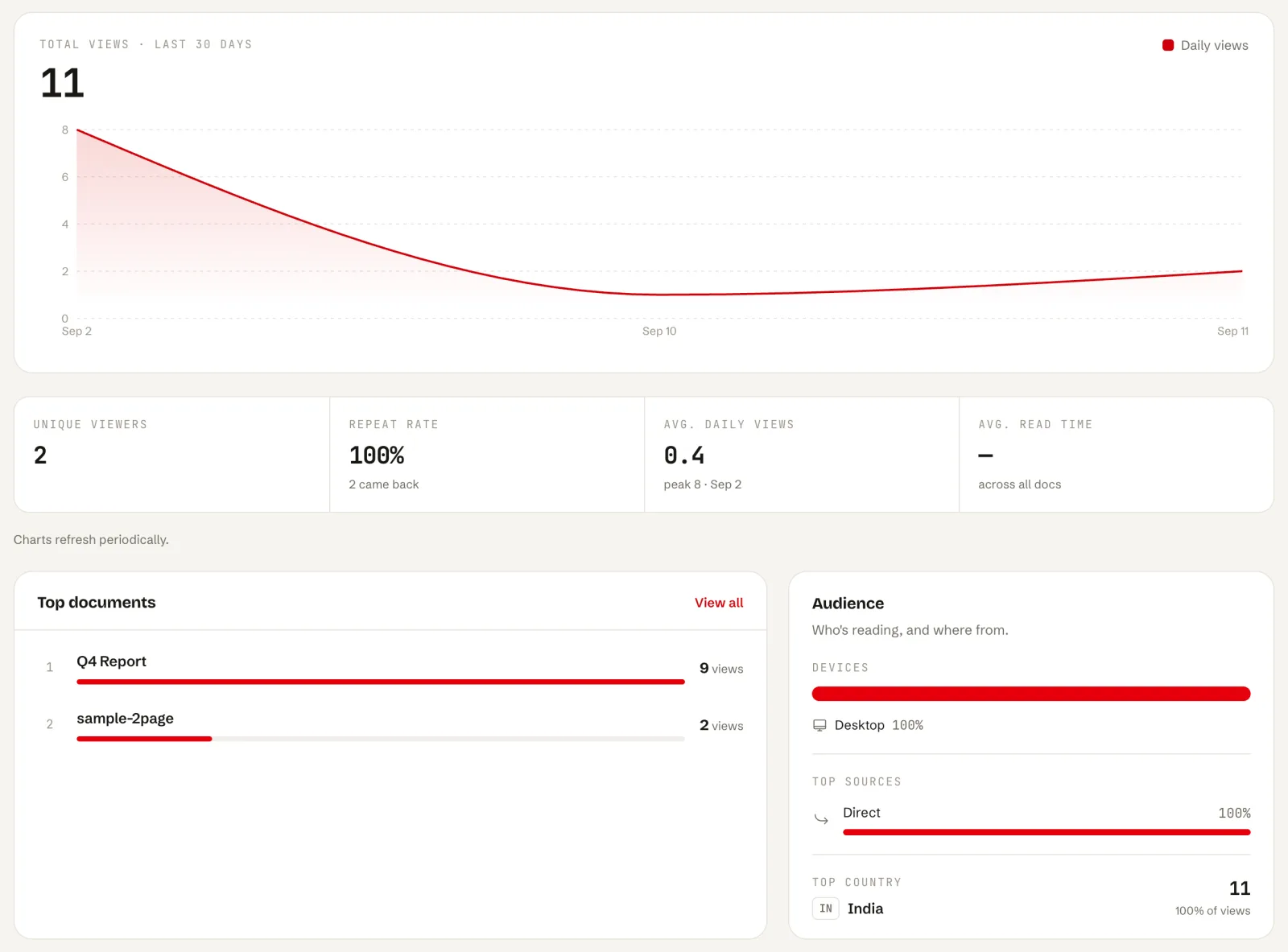
- You get an email the first time someone else opens it, on every plan, including free. The free plan also shows a total view count.
- Paid plans add views over time, countries, referrers, devices and time on each page.
SharePDF tells you when the PDF was opened, not who opened it, unless you turn on email capture on a paid plan. That is a feature of how links work: anyone with the link can open it. For the full set of options, see how to tell if someone opened your PDF and tracking a PDF.
Read receipt or tracked link
| Email read receipt | Tracked PDF link | |
|---|---|---|
| Works on personal Gmail | No | Yes |
| Reader can decline | Yes | No prompt |
| Shows the PDF was opened | No | Yes |
| Shows which pages were read | No | Yes, on SharePDF paid plans |
| Tells you who opened it | Yes, if it arrives | Only with email capture |
Is it fair to track a document?
A tracked link sees the same thing any website sees when a page is visited: that it was opened, roughly where from, and on what kind of device. It does not read the reader's email or files. If you send documents to clients, say in your email that it is a link, and keep sensitive files behind a password.
FAQ
What does "read receipt requested" mean?
The sender asked to be told when you open the message. Your mail app may ask whether to send it. You can say no.
Can someone see that I read their email without a receipt?
Some emails contain tracking images that report when they load. Many mail apps block or proxy those images, which makes them less accurate. A plain email without tracking cannot report anything.
Do read receipts tell you when an attachment is opened?
No. They describe the email. To know whether a PDF was opened, send it as a tracked link.
Do read receipts work in Gmail?
Only on Google Workspace accounts where an admin has allowed them. Not on personal gmail.com accounts.
Why didn't I get a read receipt?
The reader declined, their mail app does not send receipts, or their account type does not support them. It does not mean they did not read it.
Is there a free way to know when a PDF is opened?
Yes. SharePDF's free plan emails you the first time someone else opens an unlisted PDF and shows a total view count. Start with PDF to link.