How to Tell If Someone Opened Your PDF
Email read receipts and cloud storage do not tell you when someone opens your PDF. Here is what actually tracks views, readers, and read time.
You sent a PDF - a proposal, an invoice, a resume - and now you're waiting. Did they open it?
The answer depends on how you sent it. An attachment tells you nothing. A cloud storage link tells you very little. A hosted link with analytics tells you what happened after the open.
Can You Tell If Someone Opened Your PDF?
| How you sent it | What you learn |
|---|---|
| Email attachment | Nothing - read receipts confirm the email, not the file |
| WhatsApp / Messenger file | Nothing - no "opened" indicator for documents |
| Google Drive / Dropbox link | Partial view activity, only for signed-in viewers |
| Hosted link with analytics | Views, unique readers, read time, pages reached, location |
A file sitting in someone's inbox is invisible. A link that serves the PDF through a viewer you control records every open, because each open is a page load you can measure.
What Email and Cloud Storage Can't Tell You
Email read receipts confirm the email was opened, not the attachment. They depend on the recipient's cooperation - Gmail doesn't offer them to regular accounts, and many clients block tracking pixels by default. Attachments also create copies you can't update later.
Google Drive shows some view activity for files you own, but only for signed-in viewers, and it doesn't tell you how much of the PDF was read or whether it was downloaded. Dropbox's activity log is similar and mostly limited to paid plans. Both put your document behind sign-in prompts and "Request access" screens.
How PDF View Tracking Works
When someone opens a tracked link, the viewer records the open as a view, then page-level events as they read - which pages they reached and how many seconds they spent on each. A visitor hash (IP address plus browser, no cookies) separates unique readers from repeat visits, and each view is logged with referrer, country, device, and traffic source.
Three honest caveats:
- Downloads end the trail. If someone downloads the PDF and opens it locally, tracking stops there.
- Views aren't names. Tracking counts readers, not identities. If you need to know who opened it, require an email before viewing.
- Security scanners can inflate counts. A single view with no reading time usually isn't a person.
How to Track a PDF You've Already Sent
You can't add tracking to a file that's already in someone's inbox. Going forward:
- Upload your PDF. Drag and drop the file - Word and PowerPoint documents convert automatically.
- Share the link instead of the file. Paste it into email, WhatsApp, Slack, or wherever the conversation lives.
- Check the analytics for that PDF in your dashboard.
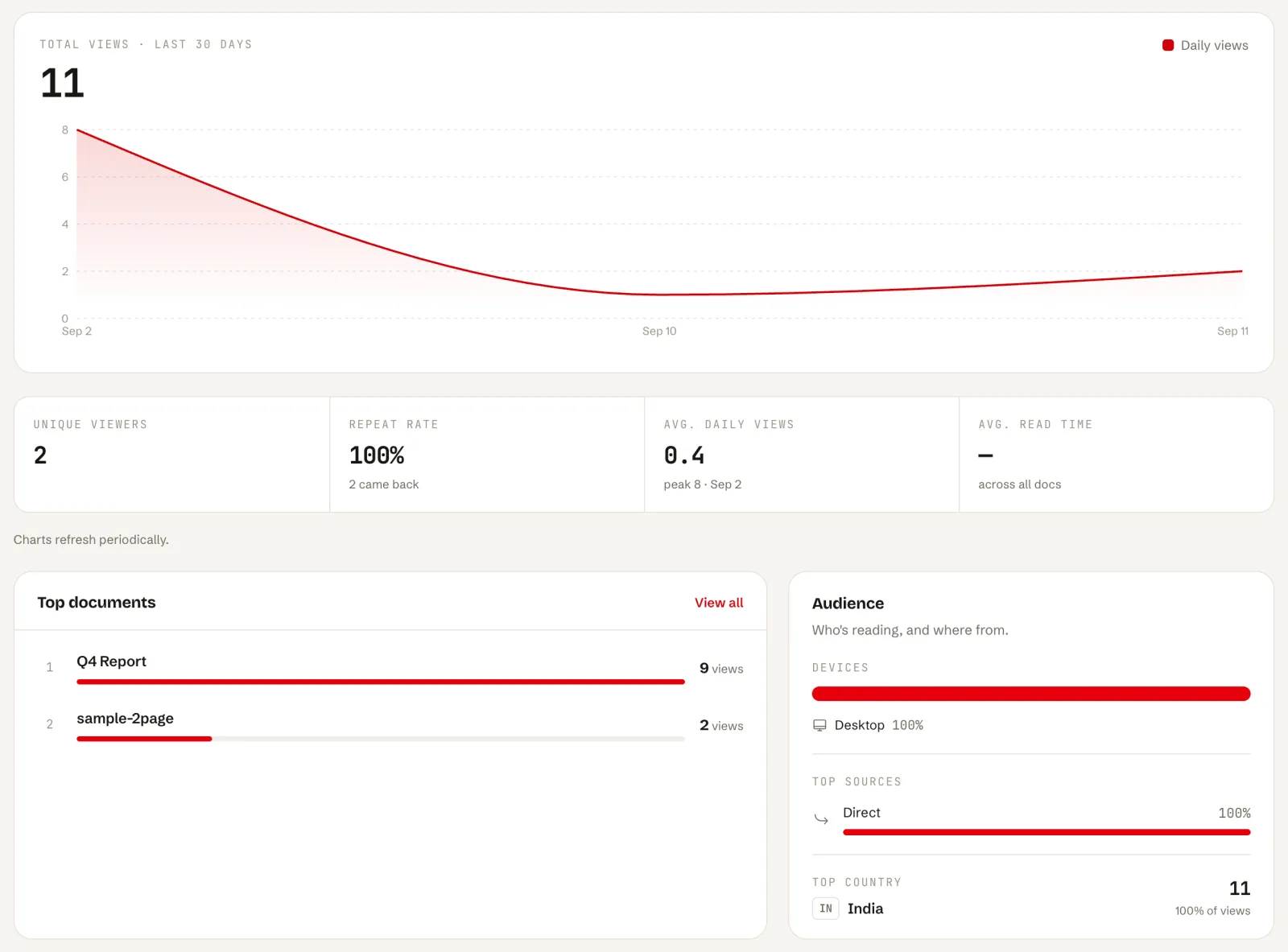
You'll see views over time, unique and repeat readers, average read time, which pages were reached and how many readers made it to the end, plus traffic sources, devices, and countries. You can also protect the link with a password, add an expiry date, or turn off downloads so the document can only be viewed online.
If you need to know who opened it, email capture asks viewers to identify themselves before the PDF opens.
What the Numbers Mean
- 20 views but 3 unique readers means the link is being forwarded or re-opened. Either way, there's interest.
- High views, near-zero read time means people are opening it and bouncing.
- Completion rate near 100% means they read it to the end. That's the moment to follow up.
The practical move: follow up while the read is fresh, not a week later.
Frequently Asked Questions
Can I track a PDF I already sent as an email attachment?
No - tracking has to be in place before the file is opened. Send the PDF as a link next time, or follow up with a tracked link when you have an update worth sharing.
Does tracking work with password-protected PDFs?
Yes. The password gate opens before the viewer loads, so once someone unlocks the link their views are recorded like any other share.
Can the viewer tell they're being tracked?
There's no banner announcing it, and the viewer page shows no ads or third-party tracking cookies. For legal, HR, or sensitive documents, it's fair to say so upfront.
Try It on Your Next Send
Upload once, share the link, and know within minutes whether it landed. SharePDF is free to start - and if you're still deciding how to send documents in general, start with the best ways to share a PDF.